Disaster Operation
If just the keyboard or just the mouse has failed, then try changing the batteries.
If both the keyboard and mouse have failed, this could well be the USB port on the tablet.
On one of the long edges of the tablet are 2 buttons - the shorter button (nearest the corner) is the power button, the longer button next to it is the Volume Up/Down button.
This longer button is, in effect, 2 buttons.
If you hold down the right side of this long button (ie furthest away from the power button) it turns the volume down; hold down the side nearer to the power button and it turns the volume up.
To reset the tablet simultaneously hold down for 20 secs both the Power Button and the Volume Down Button.
The tablet screen should go black, the Android Operating System should restart and a minute or so afterwards the regular screen should re-appear.
No log-on credentials are required.
This usually fixes any USB problems.
If the Tablet has failed, or is missing you can run everything from a mobile phone (in landscape).
The Url is on the back of the username/password bit of paper in the small plastic dongle box.
This will still call the Sumup machine.
If the Sumup machine has failed, then you can still take card payments using the website (see screenshot below).
It's a bit slower because customers need to enter their card details rather than just swipe the card.
To speed up the process, all customers could do this in parallel on their own phones.
The Url is edinburghjazz.com (or google for Edinburgh Jazz Jive)
- Cash Customers Take the cash. Make a note of their member number. Keep a count of guests
-
Card Customers On any phone (eg their phone), go to the JnJ website : edinburghjazz.com (or google for Edinburgh Jazz Jive)
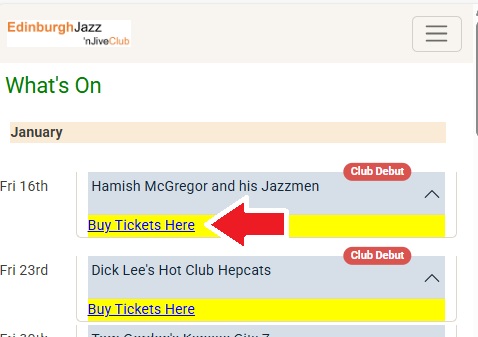
Get them to buy the tickets using their card and they show you the confirmation screen from Sumup :
You don't need to keep a note of member number or number of guests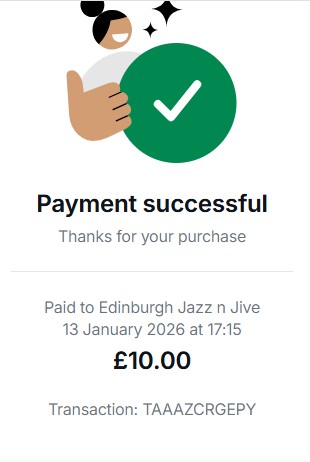
After Door App has recovered:
- On the Pay-At-Door page Enter all the member numbers you recorded above who paid by cash and enter tham as normal (pay by cash).
Just enter the total number of guests in 1 go - On the Doorlist Page You will see a list of all those who paid. Just 'admit' them all